How to Find and Fix Broken Links (Free Tool + Step-by-Step Guide)
You can find broken links (404 errors) on any website instantly using a free broken link checker, and fixing them is a simple matter of updating the URL or setting up a permanent 301 redirect. Internal broken links are especially damaging to SEO, as they waste your crawl budget and leak ranking authority into dead ends.
Whether you're fixing a single high-traffic landing page or performing a full-site audit, this guide provides the exact steps to identify and resolve every dead link.
In this guide, we will cover:
- What broken links and 404 errors actually are
- Why even a single broken link on a key page can damage your SEO
- How to use our free Broken Link Checker to audit any page instantly
- How to read and act on the results (internal vs. external links)
- Step-by-step fixes for every broken link you find
- Best practices to prevent them from coming back
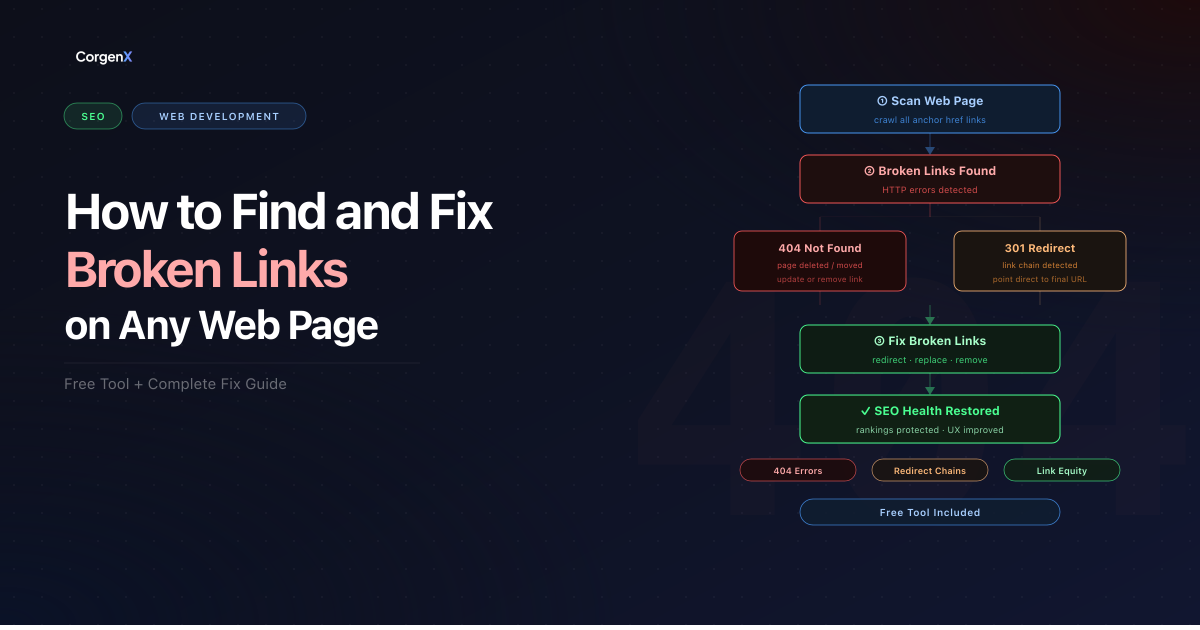 How to Find and Fix Broken Links
What Is a Broken Link?
A broken link is any hyperlink on your page that leads to a destination that no longer exists or cannot be reached. When a user or search engine bot follows that link, the server responds with an error instead of a valid page.
The most common and damaging error type is the 404 Not Found — the server is reachable, but the specific page does not exist.
Why Do Links Break?
Links do not break randomly. There are usually clear triggers:
- Page deletion — A page is removed without setting up a redirect.
- URL restructuring — A site migration or permalink change leaves old URLs orphaned.
- Typos in the URL — A manually entered link contains a small error that nobody caught.
- External pages going offline — A third-party resource you linked to has been taken down.
- Domain changes — A site you reference moves to a new domain without redirecting old URLs.
- CMS Plugin or Theme Updates — Sometimes an update to your WordPress theme or a SEO plugin can silently change your permalink structure.
- HTTPS Migrations — Moving from
httptohttpscan leave behind "mixed content" or hardcoded old links that fail if the server isn't handled correctly. - Seasonal/Campaign Deletion — Temporary landing pages for Black Friday or specific launches are often deleted after the event.
Internal vs. External Broken Links
Understanding the type of broken link you are dealing with shapes how you fix it.
| Link Type | Description | Who Controls It? | Priority |
|---|---|---|---|
| Internal | Points to other pages within your own website. | You | High |
| External | Points to pages on other websites (third-party). | Third-party | Medium |
Both types hurt the user experience. Internal broken links also directly impact how Google crawls and understands your site structure.
The Deep Impact: Why Broken Links Hurt Your SEO
It is tempting to think of broken links as a minor housekeeping issue. In reality, they attack your site's health across four critical vectors.
1. Wasted Crawl Budget
Google doesn't crawl your site infinitely. Every site has a Crawl Budget — a limited number of pages Googlebot will process in a given timeframe. When a crawler hits a broken link, it wastes an expensive "request" on a 404 error. If your site has dozens of broken links, you are effectively paying with your SEO visibility to have Googlebot crawl dead ends instead of your new, indexable content.
2. Disrupted PageRank (Link Equity)
Internal links are the pipelines through which PageRank (Link Equity) flows. When you link from a high-authority page to a new post, you are "voting" for that post. A broken link is a leak in that pipe. The authority stops at the 404, failing to reach the destination and weakening your overall domain structure.
3. Lower E-E-A-T Signals
Google's E-E-A-T (Experience, Expertise, Authoritativeness, and Trustworthiness) guidelines emphasize the importance of site quality. Frequent broken links signal poor site maintenance and lack of editorial care — a well-maintained site does not casually serve 404 errors to visitors or crawlers. This erodes Google's confidence in your site's overall trustworthiness and authority.
4. Poor User Experience
When a real visitor follows a broken link and lands on a 404 page, they leave immediately without engaging with your content. This creates a poor experience signal — the visitor arrived, got nothing useful, and left. On high-traffic pages, this pattern repeats at scale: users who expected to find content find a dead end instead, undermining the credibility of your page and increasing the likelihood they return to Google to find a better result.
How to Find Broken Links on Your Website
There are three reliable methods to find broken links, depending on how thorough an audit you need.
Method 1: Free Broken Link Checker Tool (Fastest)
The fastest way to audit any page is our free Broken Link Checker. No signup, no installation — paste a URL and get a full status report of every link on that page within seconds. The tool flags 404 errors, distinguishes internal from external links, and shows exactly which URLs need attention.
Best for: auditing individual pages before a campaign launch, checking landing pages after a migration, or a quick spot-check on your highest-traffic pages. Check your site for free right now →
Method 2: Google Search Console — Coverage Report
Google Search Console shows you which URLs on your own site Googlebot has encountered as 404 errors — sourced directly from real crawl data, not a simulation.
- Open Google Search Console
- In the left sidebar, click Indexing → Pages
- Scroll down to the "Why pages aren't indexed" table
- Click "Not found (404)" to see every URL Google tried to crawl and received a 404 response
- Use this list to identify which internal pages need a redirect or a fix
This method surfaces URLs that are broken from Google's perspective — including old URLs that still receive inbound links from other sites even after you've deleted the page.
Method 3: Browser Extension — Check My Links (Chrome)
For a quick single-page spot-check without leaving your browser, the Check My Links Chrome extension highlights every broken link directly on the live page you're viewing. Working links turn green; broken ones turn red with the HTTP status code shown inline. No URL entry needed — install it, visit any page, and click the extension icon to get an instant overlay of every link's status.
Best for: quickly reviewing a page you're already editing, or auditing a page you don't own and can't run through your own tools.
Find broken links on your site instantly — use our free Broken Link Checker tool
No signup. No install. Paste a URL and get a full link status report in seconds.
Step-by-Step: Using the CorgenX Broken Link Checker
Our free Broken Link Checker scans every hyperlink on a page and returns a clear status report. Here is exactly what to expect.
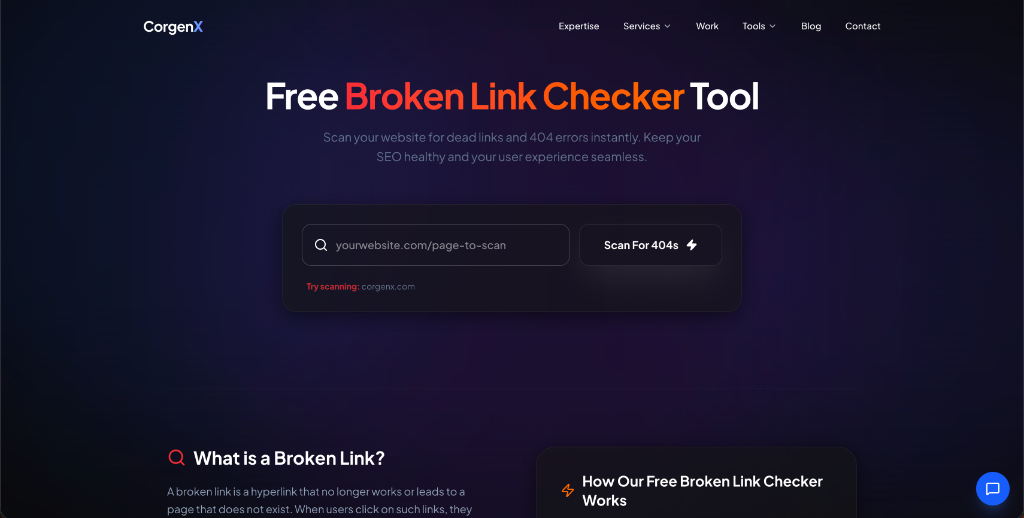 Figure 1: The CorgenX Broken Link Checker interface — enter your URL and scan for 404s in one click.
Step 1 — Enter the Page URL
Paste the exact URL of the page you want to audit into the input field. This should be the full address including https://.
Step 2 — Run the Scan
Click Scan for 404s. The tool immediately crawls all hyperlinks found on that page in real-time.
Step 3 — Review Your Results
The tool returns a clear visual report showing every link on the page and its HTTP status code.
[SCREENSHOT: tool results showing broken links found]
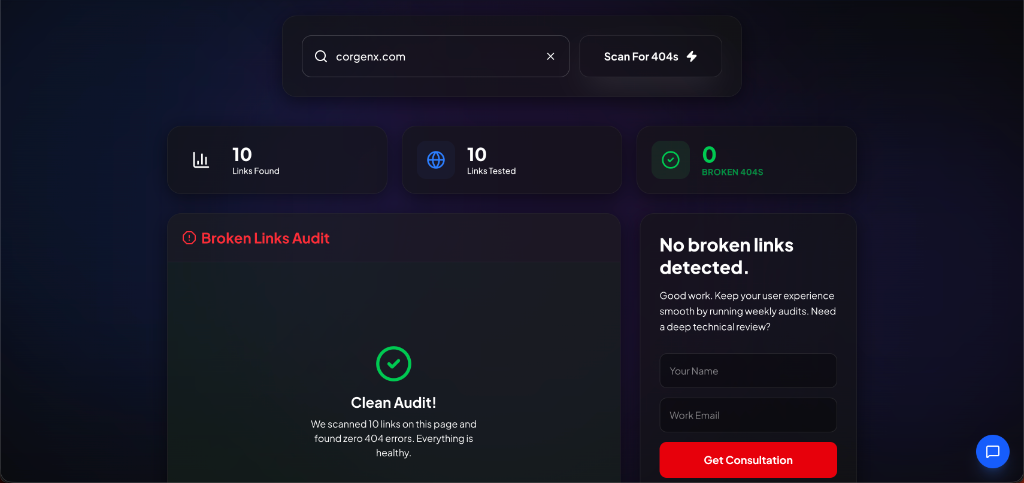 Figure 2: A "Clean Audit" result indicates all links on your page are working correctly.
Step 4 — Identify the 404 Errors
Any link returning a 404 status is flagged clearly in the report. This allows you to pinpoint exactly which link needs attention and whether it is an internal or external URL.
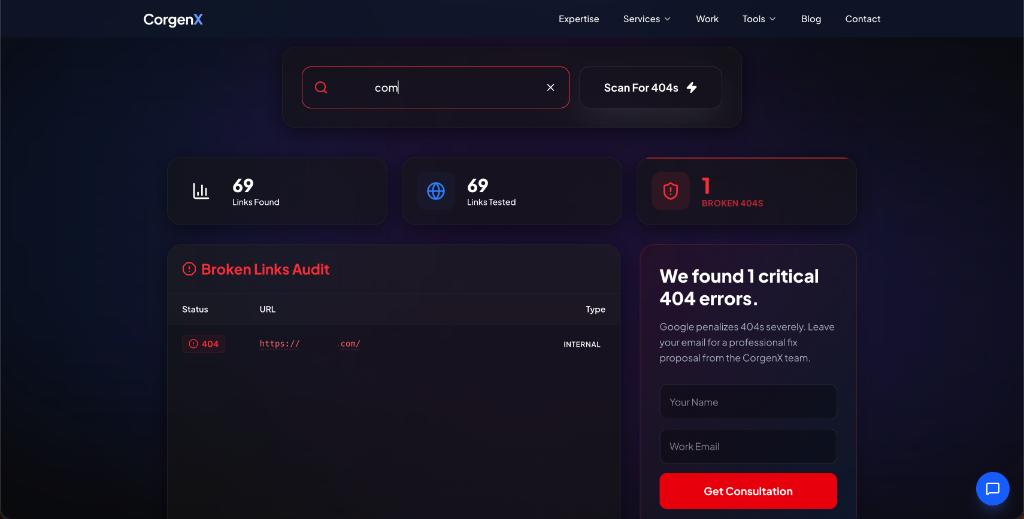 Figure 3: Finding 404 errors is straightforward with detailed per-link status reporting.
💡 Recommended Audit Frequency:
- Campaign Launch: Scan landing pages 24h before going live.
- Site Migration: Scan all key landing pages immediately after launch.
- Content Updates: Scan anytime you add more than 3 outbound links.
- Maintenance: Run a monthly audit on your Top 10 high-traffic pages.
How to Fix the Broken Links You Find
Once you have your report, follow this priority order to resolve the issues:
- Internal 404 Links (High Priority): These are entirely within your control. Update the URL or set up a 301 redirect immediately.
- Key Page External 404s (Medium Priority): Replace with an alternative live source to maintain your page's authority.
- Low Traffic / Secondary 404s (Low Priority): If no replacement exists, simply remove the link to keep the page clean.
Fix Method 1 — Set Up a 301 Redirect
A 301 redirect is a permanent move command that tells browsers and search engines: "The page at URL A is now permanently at URL B." This is the gold standard fix for broken internal links because it preserves link equity, updates Google's index automatically, and seamlessly sends users to the correct page — all without them ever seeing a 404. Use this when a page has moved to a new URL or been merged into another page.
In WordPress, the Redirection plugin handles this without touching code. In Next.js, add the redirect to your redirects() array in next.config.js.
Fix Method 2 — Update the Link Directly
If the broken link is simply pointing to the wrong URL — a typo, an outdated path, or a page that moved — the fastest fix is to edit the anchor tag and update the href to the correct live URL. No redirect needed. This is the cleanest option when only one or two links point to the broken destination and you have direct access to edit the content that contains them.
Fix Method 3 — Remove the Link Entirely
If the destination page no longer exists, has no useful replacement, and the link is not adding meaningful value to the content, remove it. A page with no link is better than a page with a link that leads nowhere. This is the right call for outdated references, discontinued tools or services, and external links to sites that have permanently gone offline with no equivalent alternative.
Fix Method 4 — Restore the Missing Page
Sometimes a page was deleted by mistake — or the content still has genuine value and ranking potential that you've lost by removing it. In that case, the right fix is to restore the page at its original URL rather than patch around its absence. Check your CMS drafts or version history, republish the content, and the broken link resolves itself automatically. This is especially worth doing when the deleted page had inbound backlinks from other sites or was ranking for keywords you still care about — restoring it recovers all of that lost equity immediately, whereas a redirect to a different page captures only some of it.
Common Broken Link Mistakes to Avoid
- Fixing External but Ignoring Internal: Focus on your own site first; it's where you have full control.
- Deleting Pages Without Redirects: Never "just delete" a page. Always point it somewhere relevant to maintain ranking authority.
- Ignoring the Deep Pages: Most broken links hide in deep blog content and archives that haven't been touched in years.
- Link Removal as Only Resort: Always try to find a relevant replacement source before deleting a link entirely.
Best Practices to Prevent Broken Links
- Audit Key Pages Monthly: Use our free Broken Link Checker to scan your highest-traffic pages at least once a month. Most broken links develop slowly — a page you linked to last year may have moved or been deleted without notice.
- Always Set Up Redirects During Migrations: Never delete or move a page without a redirect plan. Every URL that receives inbound links or organic traffic should 301 redirect to the most relevant live page — never to the homepage as a catch-all.
- Audit Before Every Campaign Launch: A broken link on a paid landing page wastes your entire ad budget. Add a broken link scan to your pre-launch checklist — run it on the target URL 24 hours before going live.
- Monitor High-Value External Links: External sites you link to can go offline, restructure their URLs, or remove the specific content you referenced — without any warning. Periodically spot-check your most important outbound links, especially on cornerstone content and high-traffic pages.
Fix Broken Links Before They Cost You Rankings
Broken links are one of the most overlooked issues in website maintenance — and one of the easiest to fix when you catch them early. By targeting your most important pages and performing regular audits, you can ensure a seamless experience for both users and search engines.
Ready to find the broken links on your most important pages? Use our free Broken Link Checker — no signup required, instant results.
FAQs
How many broken links is too many?
There is no universal threshold, but the practical answer is: any broken internal link on an important page is one too many. A single broken link on your homepage or a high-traffic pillar page is more damaging than ten broken links buried in old blog posts that nobody visits. Prioritise by traffic and authority — fix broken links on your top 20 pages immediately and work through the rest systematically. If a site-wide crawl reveals hundreds of broken links, that signals a structural problem — likely a past site migration carried out without a redirect plan — that needs a systematic fix, not just link-by-link patching.
Do broken links affect Google rankings?
Yes, but indirectly rather than through a direct penalty. Broken links do not trigger a direct ranking penalty from Google. What they do is waste crawl budget (Googlebot spends requests processing 404 pages instead of indexing your content), leak link equity into dead ends, and create poor user experiences that reflect badly on your site's overall quality. On pages with strong external backlinks, a broken internal link structure means that authority is never distributed to the pages that need it most. The cumulative effect of many broken links, especially internal ones on high-value pages, can meaningfully suppress rankings over time even without a formal Google penalty.
How often should I check for broken links?
For most websites, a monthly audit of your top 10–20 pages is the right cadence. Beyond that, you should scan immediately after any site migration, CMS update, permalink structure change, or URL restructure — these events are the most common triggers for mass broken link events. If you run paid campaigns, add a broken link check to your pre-launch checklist for every landing page. For larger sites with frequent content updates, consider a weekly automated check using Screaming Frog or integrating Google Search Console's Coverage report into your regular SEO review.
What is the difference between a 404 and a 410 error?
Both errors mean a page cannot be found, but they communicate different things to Google. A 404 Not Found tells Google the page does not currently exist — but leaves open the possibility it might return. Google will recrawl a 404 URL periodically to check. A 410 Gone is a permanent signal: the page is gone and will not come back. In practice, Google has stated it treats 404 and 410 similarly for deindexing — both result in the URL being removed from the index over time. The 410 status is still worth using when you have permanently deleted a page, as it communicates clearer intent to crawlers, but the real-world SEO difference between the two is minor. In practice, most servers return 404 by default. If you have permanently deleted a page with no intention of restoring it, returning a 410 is the more precise and accurate signal — but either response is acceptable, and the difference in SEO impact is minor compared to having the correct redirects in place.
Can broken external links hurt my SEO?
Broken external links — links on your pages pointing to other websites that return 404 — do not cause direct ranking penalties, but they create real problems. They damage user experience when visitors click a reference and land on a dead page, reducing trust in your content. They also signal to Google that your content is outdated and poorly maintained, which weakly undermines your E-E-A-T signals over time. The SEO risk from broken external links is lower than from broken internal links, but they are worth fixing on your most important pages. The fix is simple: either update the link to a working equivalent source, or remove it if no relevant replacement exists.
Related Articles
Ready to Scale?
Our high-performance web solutions and SEO strategies are designed to deliver results.
Check out our services