WordPress vs Next.js for Business Websites (2026)
If your team manages content regularly and needs a website live quickly, choose WordPress. If you need maximum performance, custom functionality, or a web application, choose Next.js. Most businesses fall clearly into one camp — this guide will tell you which one you are in.
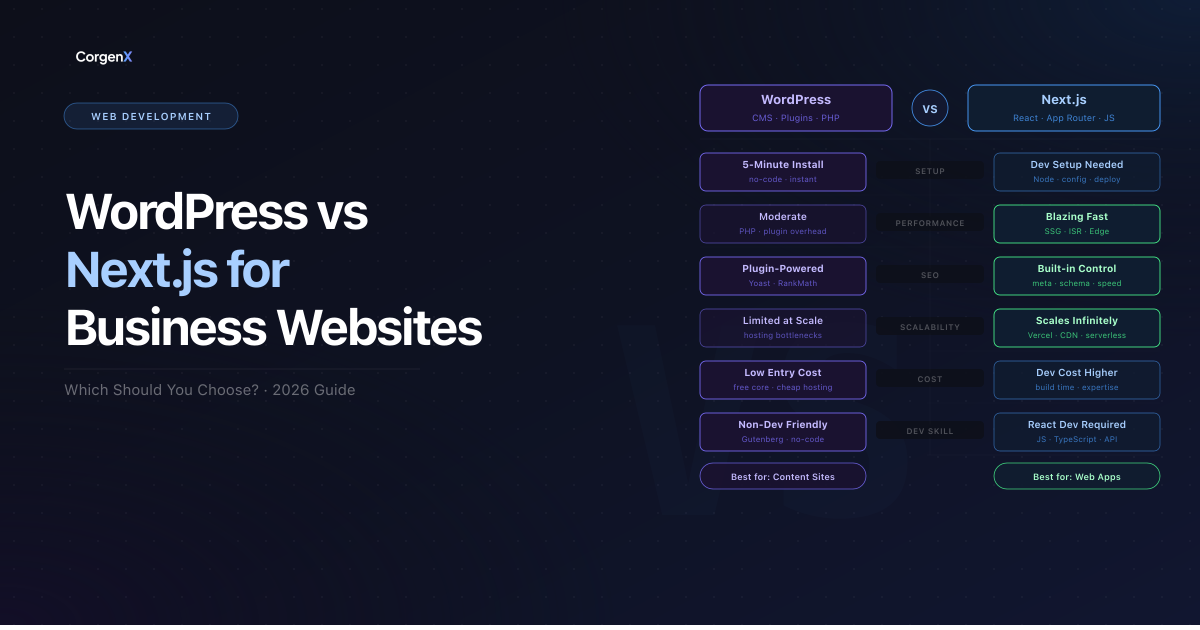 WordPress vs Next.js for Business Websites (2026)
Before comparing them directly, you need to understand one thing: WordPress and Next.js are not the same type of tool. WordPress is a complete Content Management System — it handles your database, admin panel, themes, and content editing out of the box. Next.js is a React framework — developers use it to build fast, custom websites, but it has no built-in editor, admin panel, or database. You are comparing a fully furnished office to an empty floor with a building permit. Both can house your business — but they require entirely different inputs and serve different goals. With that framing clear, here is how they actually compare across the decisions that matter.
WordPress vs Next.js: What Each Actually Is
WordPress: The World's Most Used CMS
WordPress powers 43% of all websites on the internet in 2026 — from BBC America to Sony Music to millions of small businesses globally. It is open-source, free to install, and runs on PHP with a MySQL database.
Out of the box, WordPress gives you:
- A visual block editor (Gutenberg) for building pages without code
- 60,000+ plugins for every feature imaginable
- Theme-based design with tools like Elementor
- Multi-user roles and author management
- Built-in media library, blogging, and scheduling
Its core value: non-technical teams can manage everything independently — publish content, update pages, add products — without involving a developer every time.
Next.js: The React Framework for Production Websites
Next.js is built and maintained by Vercel. It powers the web frontends of TikTok, Hulu, Twitch, and Notion. It is not a CMS — there is no admin panel, no content editor, and no database layer.
What Next.js gives you:
- Server-Side Rendering (SSR) and Static Site Generation (SSG) for blazing-fast page loads
- API routes built into the same project
- Automatic image optimization and lazy loading
- React Server Components for granular performance control
- Edge-ready deployment on Vercel or Netlify
Its core value: developer control and performance — every page is fast by architecture, every integration is clean, and the project scales from a five-page brochure site to a full-stack application without switching platforms.
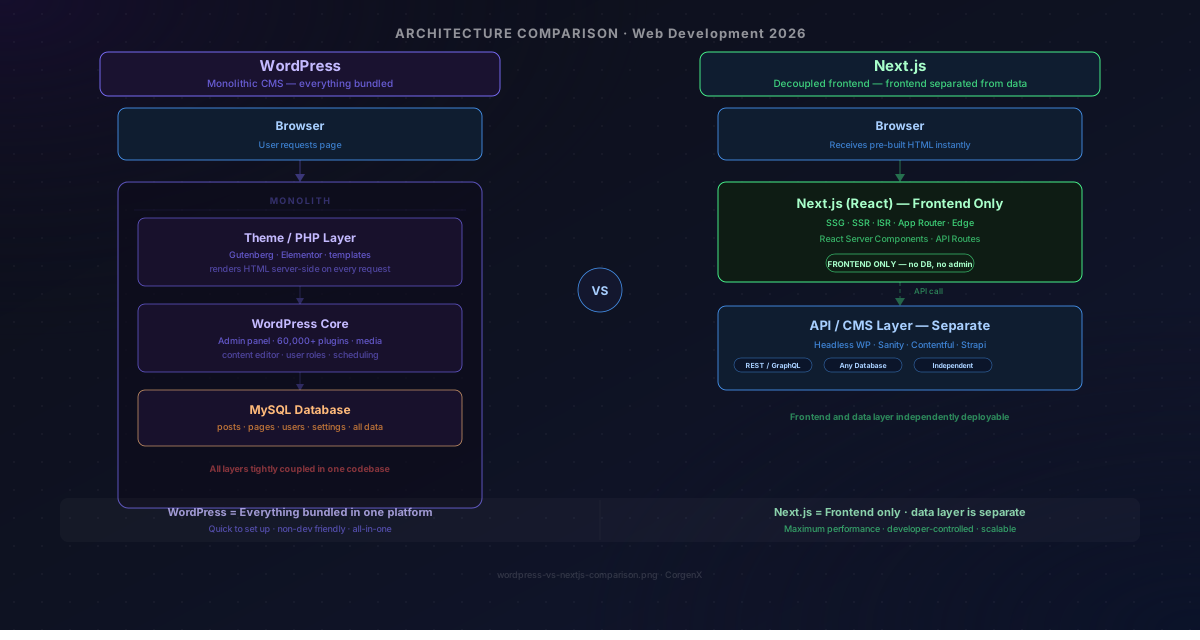 WordPress bundles everything — database, admin, and frontend — into one platform. Next.js is a framework that handles only the frontend; you bring your own data layer.
WordPress vs Next.js: Head-to-Head Comparison
Performance and Core Web Vitals
Next.js wins on raw performance — and the reason is structural, not cosmetic.
WordPress serves pages from a PHP-rendered stack. Every page request triggers database queries, plugin execution, and server-side processing. Even on managed hosting, this chain introduces latency. Getting a WordPress site to a 90+ PageSpeed score requires deliberate effort: a caching plugin (WP Rocket, W3 Total Cache), a CDN, image compression, and regular database cleanup.
Next.js pre-renders pages at build time (SSG) or serves them from the edge (SSR). Users receive fully built HTML with no server-side delay. A standard Next.js deployment scores 95+ on Google PageSpeed with zero additional optimization.
This matters for SEO. Core Web Vitals — LCP, INP, and CLS are confirmed Google ranking signals. When two pages compete with similar content quality, the faster one has a structural advantage. Next.js gives you that advantage by default.
Winner: Next.js — though a well-configured WordPress site with caching and CDN can close the gap meaningfully.
SEO
Both platforms can rank on Google. The difference is in how much work it takes.
WordPress SEO depends heavily on plugins. Yoast SEO and Rank Math are the standard — they handle meta tags, XML sitemaps, schema markup, and canonical URLs. The limitation is that SEO settings are abstracted through a plugin interface, not native to the platform. Plugin conflicts, theme bloat, and slow page speed are the common failure points.
Next.js SEO is native. Every meta tag, Open Graph property, canonical URL, and JSON-LD schema block is written directly in code. There are no plugin dependencies, no conflicts, and no performance overhead from SEO tooling. The technical SEO foundation — clean HTML, fast rendering, structured data — is built into the architecture.
Winner: Next.js for technical precision — WordPress with a quality SEO plugin is fully capable for most business needs.
Content Management
This is where WordPress wins decisively.
WordPress was purpose-built for content. Its block editor, revision history, media library, post scheduling, and role-based access are mature and require zero developer involvement for day-to-day updates. A marketing manager can publish a new blog post, update the homepage hero, or swap out a team photo without touching code.
Next.js has no built-in content editor. Content either lives in code files (MDX, JSON) or in a connected headless CMS like Contentful, Sanity, or Prismic — each of which has its own learning curve and pricing. For teams that publish content frequently, this adds meaningful friction.
Winner: WordPress — clearly, unless Next.js is paired with a headless CMS.
Cost
| WordPress | Next.js | |
|---|---|---|
| Initial build | Lower — themes and plugins reduce dev time | Higher — everything is built from scratch |
| Hosting | ₹500–₹5,000/month (shared to managed WP) | ₹0–₹2,000/month (Vercel free tier is generous) |
| Plugin/tool licenses | ₹5,000–₹25,000/year for premium plugins | Minimal — open-source ecosystem |
| Developer dependency | Low for updates and content | High — any structural change needs a developer |
| Long-term maintenance | Ongoing plugin updates, security patches | Minimal — no plugin ecosystem to manage |
WordPress is cheaper to launch but accumulates ongoing costs through plugin licenses, hosting upgrades as traffic grows, and the occasional developer engagement to fix plugin conflicts or security issues.
Next.js costs more upfront in developer hours but has very low ongoing costs once built — no license renewals, no plugin maintenance, minimal hosting overhead.
Winner: WordPress for speed-to-launch — Next.js for long-term cost efficiency.
Security
WordPress is the most attacked CMS on the internet — not because it is inherently insecure, but because its 43% market share makes it a high-value target. Plugin vulnerabilities, outdated themes, exposed admin login pages (/wp-admin), and brute-force attacks are the most common threat vectors.
Next.js has a structurally smaller attack surface:
- No publicly exposed admin panel
- No plugin ecosystem running third-party code on your server
- No database layer accessible from the frontend by default
- Authentication is handled explicitly, not assumed
Winner: Next.js — more secure by default, but WordPress can be hardened effectively with proper configuration.
Scalability
Both scale, but differently.
WordPress scales through infrastructure — caching layers, CDN configuration, managed hosting providers (WP Engine, Kinsta), and database tuning. It can handle millions of visitors, but reaching that point requires deliberate engineering at each stage.
Next.js scales through deployment architecture. On Vercel, pages are served from global edge nodes and serverless functions scale automatically with zero configuration. You do not manage servers or tune a database — the platform handles it.
Winner: Next.js — scales further with less operational overhead.
When to Choose WordPress
Choose WordPress if:
- Your team publishes content regularly and needs non-technical editors to work independently
- You are building an ecommerce store — WooCommerce is mature, cost-effective, and deeply integrated
- You need to launch fast — a quality WordPress theme can go live in days
- You rely on a specific plugin for bookings, memberships, CRM integrations, or forms
- Your strategy is content-led SEO — WordPress's blogging and category architecture is built for this
When to Choose Next.js
Choose Next.js if:
- Performance is non-negotiable — you need 90+ PageSpeed scores out of the box
- You are building a web application — dashboards, SaaS tools, portals, or anything beyond a marketing site
- Your team has React developers — Next.js has a real learning curve; do not choose it without developer capacity
- You need a fully custom design — no theme constraints, pixel-perfect control over every component
- You want minimal long-term maintenance — no plugin updates, no security patches, no database cleanup
- You need clean API integrations — Next.js API routes let you connect any third-party service from within the same project
The Hybrid Option: Headless WordPress + Next.js
Here is the option most comparisons skip entirely: you do not have to choose one.
Headless WordPress uses WordPress purely as the content backend. Your editors work in the familiar WordPress admin — creating posts, uploading images, managing pages. A Next.js frontend fetches that content via the WPGraphQL API and renders it with full performance and design control.
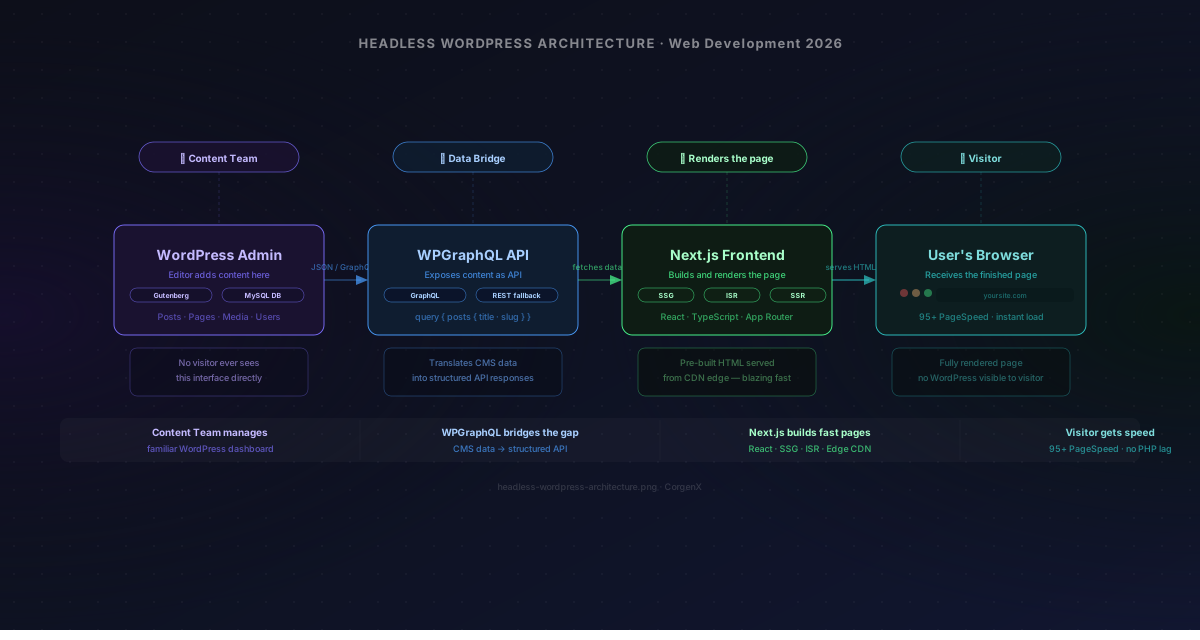 In a headless setup, WordPress handles content management and Next.js handles what the user sees. The two layers communicate through an API.
The result:
- Editors keep the WordPress interface they already know
- Your website gets Next.js speed and custom design
- Core Web Vitals benefit from static rendering
- No compromise on content management or developer experience
This is the architecture we break down in detail in our Next.js 15 + Headless WordPress guide, including WPGraphQL setup, ISR caching, CORS configuration, and every common error you will encounter.
The tradeoff is a higher initial build cost and more infrastructure to manage. But for businesses that have outgrown WordPress themes and need both editorial control and Next.js performance, the headless approach is the right long-term investment.
Quick Decision Table
| Your situation | Best choice |
|---|---|
| Small business, content-heavy, non-technical team | WordPress |
| Startup building a web app or SaaS product | Next.js |
| Ecommerce with WooCommerce | WordPress |
| Brand needing pixel-perfect custom design | Next.js |
| Blog-led SEO strategy, limited budget | WordPress |
| High-traffic marketing site, performance-critical | Next.js |
| Need editorial control + Next.js performance | Headless WordPress + Next.js |
WordPress vs Next.js: Which Is Right for Your Business?
There is no universally better platform — there is only the right platform for your situation.
WordPress wins when content management, speed-to-market, and upfront cost are the primary constraints. Next.js wins when performance, custom functionality, and long-term scalability come first. And when you genuinely need both, the headless architecture delivers — at the cost of a higher initial build investment.
At CorgenX, we build in both WordPress and Next.js based on what the project actually demands. If you are unsure which architecture fits your business goals, our web development team can assess your needs and recommend the setup that gives you the best long-term return.
Once your site is live — regardless of which platform you build on — make sure every link is working before you start driving traffic. Run a quick check with our free broken link checker.
FAQs
Is Next.js better than WordPress for SEO in 2026?
Next.js gives you more precise control over every technical SEO element — meta tags, structured data, Core Web Vitals — without plugin dependencies. WordPress with Yoast or Rank Math is fully capable of ranking well, but requires more optimization effort. The performance advantage of Next.js becomes most significant in competitive markets where page speed provides a ranking edge.
Can I migrate from WordPress to Next.js?
Yes. The most common approach is a headless migration — WordPress stays as the content backend and a Next.js frontend replaces the theme layer. This preserves all existing content, URLs, and editorial workflows while upgrading performance and design. Any URL structure changes require 301 redirects to avoid losing SEO value accumulated on existing pages.
Does Next.js need a separate CMS?
Not always. Small Next.js sites often manage content through MDX files or JSON. But for businesses where non-technical team members need to publish or update content regularly, a headless CMS — like Contentful, Sanity, or headless WordPress — is strongly recommended. Without it, every content change requires a developer.
Is WordPress still worth using in 2026?
Yes. WordPress powers 43% of the web and has one of the most mature plugin and developer ecosystems available. The Gutenberg editor and Full Site Editing features have modernized the content experience significantly. For content-driven businesses without a dedicated developer team, WordPress remains the most practical and cost-effective choice.
Which is cheaper to maintain — WordPress or Next.js?
Next.js has lower ongoing maintenance costs once built. There are no plugin licenses, no security patches from a plugin ecosystem, and no database overhead. WordPress accumulates maintenance costs over time through premium plugin renewals, hosting upgrades, and the occasional developer fix. For a static brochure site that rarely changes, Next.js can be the more economical long-term choice.
What is headless WordPress and when should I use it?
Headless WordPress decouples the content backend (WordPress admin) from the frontend presentation layer (Next.js). Your editors work in WordPress as usual, while users see a Next.js-rendered website with full performance and custom design. It is the right choice when you need both strong content management and high-performance frontend delivery — typically for growing businesses, digital agencies, and content-heavy brands that have outgrown standard WordPress themes.
How long does it take to build a Next.js website vs a WordPress site?
A WordPress site using a premium theme and page builder can launch in one to two weeks. A custom Next.js site typically takes three to six weeks depending on complexity, because every component is built from scratch. The headless WordPress + Next.js setup sits in between — four to eight weeks — given the additional API integration and caching configuration required.
Related Articles
Ready to Scale?
Our high-performance web solutions and SEO strategies are designed to deliver results.
Check out our services