CRM Software for Business: Complete 2026 Guide
A CRM (Customer Relationship Management) is software that centralizes every interaction your business has with prospects, leads, and customers — and automates the sales, marketing, and service workflows around that data. It replaces disconnected spreadsheets, inboxes, and sticky notes with a single system where every email, call, deal, and support ticket is logged, tracked, and visible to your entire team. The result: fewer leads fall through the cracks, sales cycles get shorter, forecast accuracy improves, and customer retention increases measurably.
If your business is managing customer relationships across spreadsheets and scattered tools, you are almost certainly losing revenue to missed follow-ups, duplicated effort, and decisions made on gut instinct rather than data. A properly implemented CRM typically improves lead-to-close conversion rates from 5–12% to 15–25%, shortens sales cycles by 20–35%, and reduces customer churn from 15–25% annually to 8–12% — these are ranges drawn from real implementations across business types, not vendor marketing. Whether you are a founder manually tracking prospects, a sales leader whose team is using three disconnected tools, or a growing business trying to understand why 40% of your leads go cold before anyone follows up — the answer almost always involves implementing the right CRM in the right way.
In this guide, we will cover:
- What CRM software actually is — and what it is not
- The three core business problems CRM solves at every stage of growth
- How CRM transforms sales pipeline management and revenue predictability
- How marketing teams use CRM data to build campaigns that generate qualified leads
- How customer service teams use CRM to improve retention and reduce churn
- The business metrics that change when CRM is implemented correctly
- How to choose the right CRM platform for your business stage and model
- The complete CRM implementation process — discovery through launch
- Common CRM implementation failures and how to avoid them
- How CorgenX approaches CRM implementation for growing businesses
 CRM Software for Business: Complete 2026 Guide
What CRM Software Actually Is — and What It Is Not
The most important distinction: CRM is not a contact database. A spreadsheet with names and phone numbers is a contact database. A CRM is a living system that tracks the full history of every relationship — who said what, when they said it, what they bought, what support issues they raised, and what their current value and risk profile looks like. That difference — static list vs. dynamic relationship engine — is what separates businesses that scale from those that plateau.
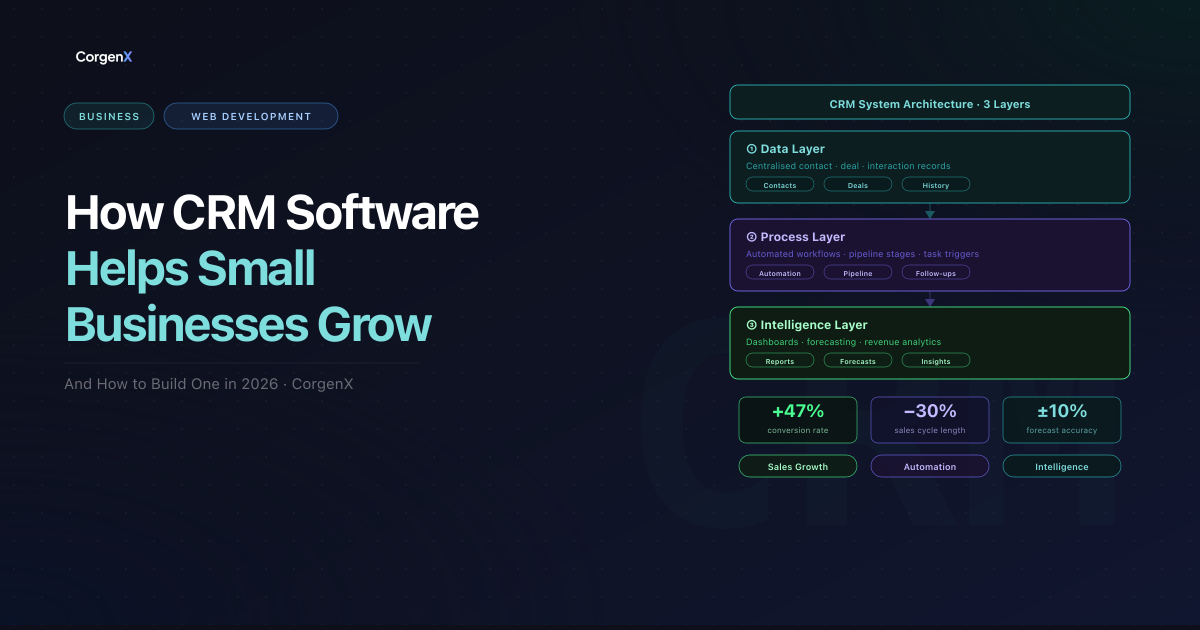
The three layers of a CRM system:
1. The Data Layer — a unified record for every contact, company, and deal. Every email, call, meeting, and note is centralized, timestamped, and visible to every team member with the right permissions. No data lives in personal inboxes or spreadsheets.
2. The Process Layer — automated workflows, pipeline stages, and task assignments that ensure no lead or follow-up is ever missed. When a prospect fills out a form, the CRM automatically creates a record, assigns it to the right rep, sends a confirmation, and schedules a follow-up — without anyone lifting a finger.
3. The Intelligence Layer — dashboards, reports, and forecasting that turn relationship data into business insight. How many deals are in each stage? What is the average time to close? Which marketing source generates the highest-value leads? Without a CRM, these questions go unanswered and revenue decisions are made on instinct.
The Three Core Business Problems CRM Solves
Every growing business eventually hits the same wall — a point where the relationship management approach that worked at 10 customers breaks down at 100, and breaks catastrophically at 1,000. CRM solves three specific structural problems that emerge at this wall.
Problem 1 — Leads Are Falling Through the Cracks
Without a CRM, lead management happens across email inboxes, spreadsheets, sticky notes, and memory. As volume grows, follow-ups get missed, prospects get contacted by multiple reps without context, and hot leads go cold when a rep leaves and their inbox is deleted.
A CRM eliminates this entirely. Every lead — from website forms, email, phone, or events — gets a structured record, an assigned owner, and a defined next action. Nothing is left to memory.
Problem 2 — Sales and Marketing Are Not Aligned
Marketing spends budget generating leads. Sales complains they are low quality. Marketing counters that sales is not following up fast enough. Neither team has data to prove their case — because there is no shared system connecting marketing activity to sales outcomes.
With CRM, the entire lead journey is traceable. Marketing sees which leads converted and which campaigns generated actual revenue. Sales sees every lead's full marketing history before the first conversation. Alignment becomes structural, not aspirational.
Problem 3 — Customer Relationships Are Reactive, Not Proactive
Without a CRM, customer relationships are managed reactively — support reps have no context, renewals are missed, and customers churn quietly because no system was watching for warning signs.
CRM transforms this with automated renewal reminders, health score dashboards, usage-based alerts, and scheduled check-ins — so relationships are managed on your schedule, not only when problems arise.
If your business is experiencing any of these three problems — leads slipping through the cracks, sales and marketing working in silos, or customer relationships managed reactively — a CRM is the structural fix, not a nice-to-have. At CorgenX, we help growing businesses assess exactly where their customer management process is breaking down and design the CRM architecture that fixes it. Talk to our team about a CRM readiness assessment.
How CRM Software Transforms Your Business Operations
Sales Pipeline Management
Without CRM, most sales pipelines are invisible. With CRM, every deal gets a visual position — "Initial Contact," "Qualified," "Proposal Sent," "Negotiation," "Closed Won / Closed Lost" — and only moves forward when defined criteria are met. Managers see deal counts, values, and stagnation alerts at a glance. Automated follow-up sequences handle nurture without manual effort. And with historical close rates, CRM produces reliable revenue forecasts calibrated to real data — so hiring, budget, and capacity decisions are grounded in pipeline reality, not optimism.
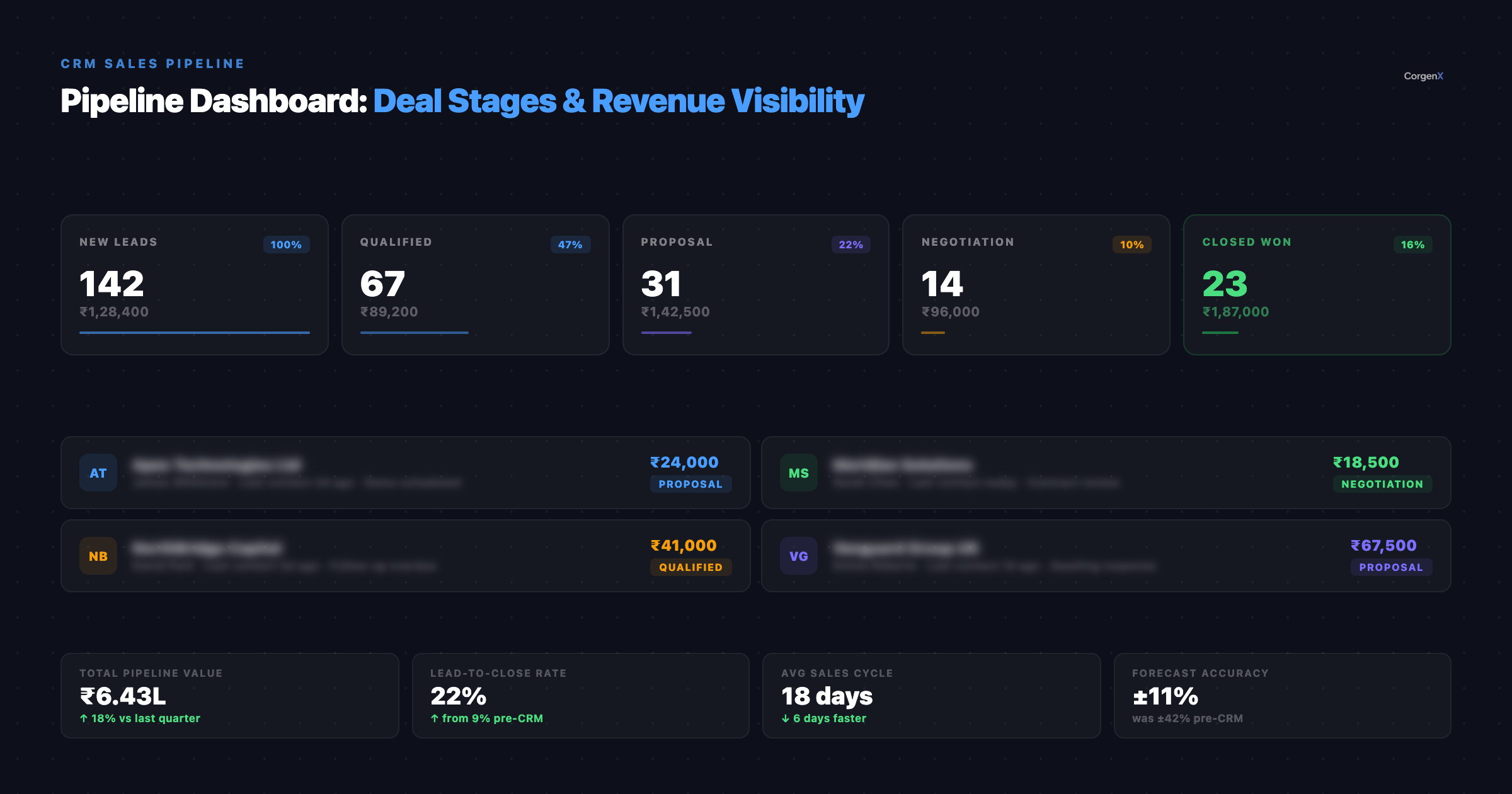 A CRM pipeline dashboard gives every deal a position, a value, and a visible status — turning an invisible revenue process into a managed, measurable system.
Marketing Intelligence
When marketing teams access CRM data, the quality of every campaign improves. Lead scoring flags high-intent prospects automatically. Campaign attribution traces every closed deal back to the channels and content that influenced it — so marketing can reallocate budget toward what actually generates revenue, not just traffic. For businesses investing in SEO and organic traffic, this shows which content drives real revenue. CRM data also enables segmentation that lets you send fundamentally different nurture sequences to different customer segments — with automation handling the routing at scale. This is what separates businesses that generate qualified leads consistently from those spending budget with no visibility.
Customer Retention and Service
For most service businesses, retention is where CRM delivers the highest return. Support reps see full account history instantly — purchases, interactions, open issues, health scores — so resolution is faster and customers feel recognized. CRM health scores flag at-risk customers before they churn by tracking usage patterns, ticket frequency, and engagement signals. For high-volume teams, CRM-integrated ticketing ensures SLA tracking with automatic escalation.
The Business Metrics That Change After CRM Implementation
The value of CRM is ultimately measured in business outcomes, not software features. Below are the specific metrics that consistently improve after a well-executed CRM implementation:
| Metric | Typical Baseline (No CRM) | Post-Implementation Range |
|---|---|---|
| Lead-to-close conversion rate | 5–12% | 15–25% |
| Average sales cycle length | Highly variable | Reduced by 20–35% |
| Lead follow-up time | Hours to days | Minutes (automated) |
| Sales forecast accuracy | ±40% | ±10–15% |
| Customer churn rate | 15–25% annually | 8–12% annually |
| Support first-contact resolution | 55–65% | 75–85% |
| Marketing attribution visibility | Minimal | Full funnel |
These are ranges drawn from real CRM implementations across business types, not guaranteed outcomes — actual results depend on the quality of the implementation, the team's adoption, and the CRM's configuration. But the direction of change is consistent across virtually every CRM implementation: more visibility, more control, and more revenue from the same or lower inputs.
Want these results for your business? CorgenX runs a free CRM readiness assessment for growing businesses — we evaluate your current sales process, data quality, and tool landscape, and tell you exactly what a CRM implementation would look like for your specific situation. No commitment required. Request your free CRM assessment here.
How to Choose the Right CRM Platform
The right CRM is the one that matches your sales process, team capability, integration requirements, and growth trajectory — it is a business decision, not a technology decision.
The Three Tiers of CRM Platforms
Entry-level CRMs (HubSpot Free, Zoho CRM, Pipedrive Essential) — for small teams (under 10 users) with straightforward sales processes. Quick to implement, low-cost or free, and a massive upgrade from spreadsheets.
Mid-market CRMs (HubSpot Sales Hub, Salesforce Starter, Zoho CRM Professional) — for teams of 10–100 with multi-product sales processes and automation needs. Three to eight weeks of implementation, but justified by the capability.
Enterprise CRMs (Salesforce Enterprise, Microsoft Dynamics 365, HubSpot Enterprise) — for complex, multi-team organizations where the CRM serves as the single source of truth across sales, marketing, service, and finance. Months to implement, significant cost.
The Five Questions That Drive Platform Selection
-
How complex is your sales process? A single product with a two-step process needs very different functionality than a seven-step enterprise cycle with multiple decision-makers.
-
What tools must the CRM integrate with? Email, marketing automation, accounting, website — integration compatibility is a selection criterion, not an afterthought.
-
How technical is your team? The right CRM matches your team's actual technical capability, not your most technical person's.
-
What are your reporting needs? If revenue forecasting and board reporting are primary, the reporting module matters more than the contact record interface.
-
What does growth look like? Migrating CRMs is expensive. If you will grow from 10 to 100 users in two years, implement a mid-market CRM now rather than migrating in 18 months.
The CRM Implementation Process: From Discovery to Launch
Choosing the right CRM platform is 20% of the implementation challenge. The other 80% is the implementation itself — the process of configuring the platform to match your business process, migrating your existing data, integrating your other tools, training your team, and managing the change management required for adoption. This is where most CRM projects fail — not because the software is wrong, but because the implementation did not match the business reality.
At CorgenX, we follow a six-phase implementation process that has been refined across dozens of CRM projects for service businesses, SaaS companies, and e-commerce operators.
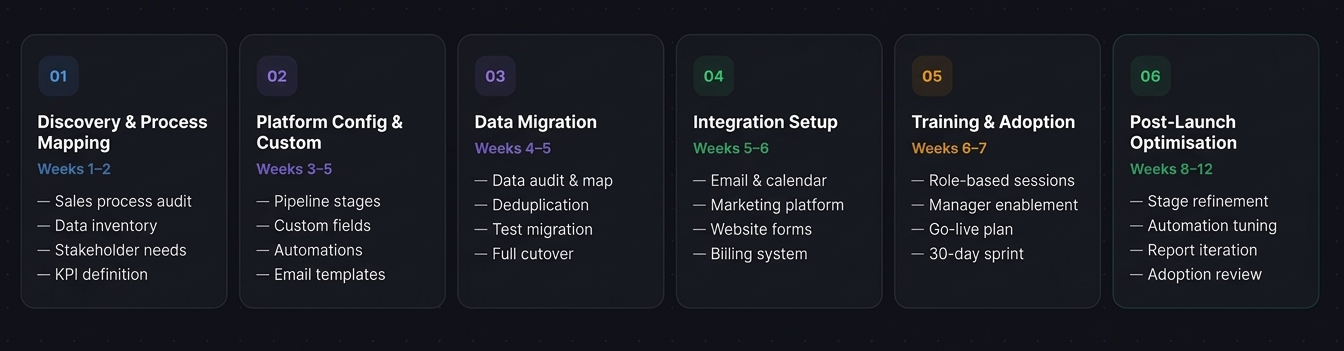 The CorgenX CRM implementation framework: six structured phases from process mapping to post-launch optimisation.
Phase 1 — Discovery and Process Mapping (Weeks 1–2)
Before any configuration, we map your current sales process, audit your data landscape, define stakeholder requirements, specify integrations, and set success KPIs. This prevents the most common failure: building around software defaults rather than your reality.
Phase 2 — Configuration and Customization (Weeks 3–5)
Pipeline stages, contact fields, automation workflows, email templates, user permissions, and dashboards are all configured to match your actual business process — not the platform's defaults.
Phase 3 — Data Migration (Weeks 4–5)
Data from all existing systems is audited, cleaned (duplicates merged, formatting standardized), test-migrated, validated, then fully migrated. Dirty data on day one kills adoption — so this phase is critical.
Phase 4 — Integration Setup (Weeks 5–6)
Email (Gmail/Outlook), marketing platforms, website forms, calendar, and accounting integrations are built and tested end-to-end with real data.
Phase 5 — Training and Adoption (Weeks 6–7)
Role-specific training for sales, marketing, and management. A "how we work" process guide for each role. Manager enablement so CRM usage becomes part of the team's rhythm. A defined go-live date followed by a two-week intensive and 30-day adoption review.
Phase 6 — Post-Launch Optimization (Weeks 8–12)
The first 90 days reveal the gap between assumptions and reality. Pipeline stages are adjusted, automations refined, dashboards simplified, and data quality processes established.
At CorgenX, this is the exact framework our web development and digital transformation team follows. If you are evaluating CRM — or need to re-implement one properly — start a conversation with our team.
Common CRM Implementation Failures — and How to Avoid Them
CRM implementations fail more often than they succeed — industry estimates suggest that between 30% and 70% of CRM projects do not deliver on their expected value. The four most common failure patterns:
Failure 1 — Skipping process mapping. The CRM gets configured around the software's defaults rather than the business's actual sales process. Pipeline stages do not reflect how the team actually sells, so adoption collapses. The fix: Always complete the discovery phase described above before touching the platform.
Failure 2 — Migrating dirty data. Duplicate records, outdated contacts, and inconsistent formatting destroy trust on day one. Reps revert to spreadsheets within weeks. The fix: A dedicated data cleaning sprint before migration, with required fields and validation rules enforced from launch.
Failure 3 — Treating training as a one-time event. A two-hour session on launch day does not build habits. The fix: Manager-led adoption — when the sales manager runs every pipeline review using the CRM, usage becomes structurally required. Combine with a 30-day post-launch intensive where blockers are removed in real time.
Failure 4 — Wrong platform for the business stage. An enterprise CRM at a 10-person startup creates complexity that slows the team down. An entry-level CRM at a 150-person company creates a ceiling within 12 months. The fix: Use the five platform selection questions outlined earlier to match the CRM to your actual business trajectory.
CRM for Business: The Right Way to Get Started
A CRM is not a software purchase — it is a decision to manage your customer relationships as a system that is visible, measurable, and continuously improvable. The potential upside: more leads converted, shorter sales cycles, accurate forecasting, higher retention, and data-driven revenue decisions.
The three implementation killers — skipping process mapping, migrating dirty data, and underinvesting in adoption — account for the majority of the industry's 30–70% failure rate. Avoid all three and you are ahead of most CRM projects.
At CorgenX, we are platform-agnostic — we have implemented CRM across HubSpot, Salesforce, Zoho, and Pipedrive for businesses of 5 to 200 people. Our development and digital transformation team and SEO and digital strategy team work together to ensure your CRM, website, and lead generation pipeline are fully connected. If you are ready to replace spreadsheets and build a customer management system that scales — reach out to our team.
FAQs
How long does a CRM implementation take?
Entry-level implementations take two to four weeks. Mid-market (with data migration and integrations) takes six to ten weeks. Enterprise is measured in months. The biggest variable is data quality — clean data means faster migration.
Which CRM is best for small businesses?
For under 10 people with a simple sales process, HubSpot CRM Free or Pipedrive are excellent starting points. For teams needing marketing automation, HubSpot Sales Hub or Zoho CRM are strong choices. The right answer depends on your process, integrations, and growth trajectory.
Do we need a developer to implement a CRM?
For basic setups, no — a non-technical team member can handle it. For complex automation, API integrations, or multi-system migration, professional support is required. Most mid-market and enterprise implementations benefit significantly from expert help.
Can CRM integrate with our existing website?
Yes — most platforms integrate natively with WordPress, Webflow, Shopify, and Squarespace, or via webhooks. When a form submission auto-creates a CRM record and triggers follow-up, lead response time drops from hours to minutes.
What are the benefits of CRM for small businesses?
The biggest wins: eliminating lost leads, automating follow-ups, and getting a clear pipeline view. Small businesses see the largest percentage improvement in conversion rates because the gap between "no system" and "a basic CRM" is where the most revenue is recovered.
How much does CRM implementation cost?
Entry-level platforms like HubSpot Free and Pipedrive Essential have subscription costs starting from ₹0–4,000 per user per month. Professional implementation support for mid-market deployments typically costs ₹4,00,000–₹20,00,000 as a one-time fee, separate from ongoing subscription costs. Enterprise platforms like Salesforce and Dynamics 365 can require ₹40,00,000–₹1,60,00,000+ in implementation investment. For current subscription pricing, check each platform's official pricing page directly — CRM pricing changes frequently.
Related Articles
Ready to Scale?
Our high-performance web solutions and SEO strategies are designed to deliver results.
Check out our services