Stop AI Bots from Crashing Your Server (2026)
AI bots crash websites in 2026 by exhausting server resources (RAM and CPU) and overwhelming cache layers like Redis through high-frequency, non-human traffic patterns. To protect your server, you must implement a multi-layered defense featuring Nginx rate limiting, Cloudflare WAF rules, and optimized robots.txt directives to block aggressive scrapers before they impact site stability.
Whether you're seeing mysterious traffic spikes or fighting total server downtime, this guide provides the exact technical configurations needed to identify, block, and mitigate the impact of AI-driven bot storms. Here is how to keep your infrastructure stable and your search rankings protected.
In this guide, we will cover:
- What AI bots are and why they crash modern servers
- The hidden costs of bot traffic on your infrastructure
- Practical fixes using robots.txt, Nginx, and Cloudflare
- How to protect your Redis cache from memory exhaustion
- Monitoring strategies to stay ahead of the curve
Let's break it down in a simple way — and more importantly, how to fix it.
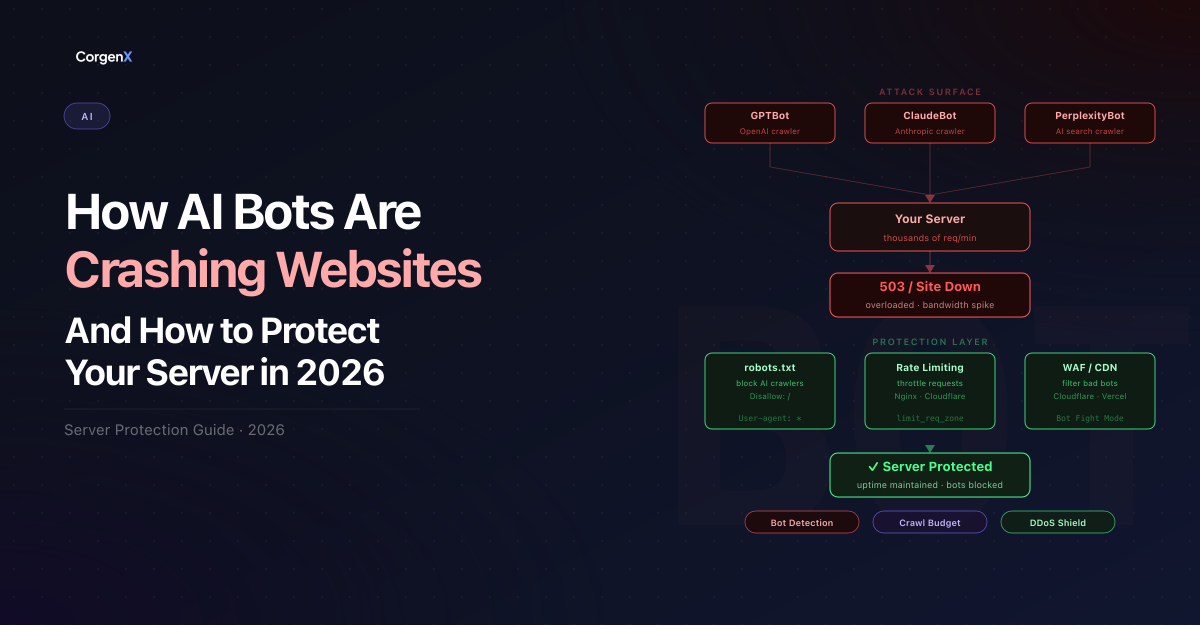 AI Bots Crashing Websites
What Are AI Bots and Why Are They a Problem?
AI bots are automated systems used by platforms, scrapers, or AI tools to collect data from websites. In 2026, the scale of this traffic is staggering: bots now account for the majority of all global web traffic, outnumbering human visitors for the first time in history.
You likely recognize the names behind these bots, even if you don't see them in your analytics:
- GPTBot (OpenAI) – Scans the web to train ChatGPT.
- Bytespider (ByteDance/TikTok) – One of the most aggressive crawlers, often ignoring
robots.txt. - ClaudeBot (Anthropic) – Analyzes content for the Claude AI model.
- CCBot (Common Crawl) – A massive non-profit crawler used by almost every major AI lab.
Unlike human users:
- They don’t browse normally – A human reads one page at a time; a bot can attempt to "read" your entire site in seconds.
- They hit multiple endpoints rapidly – They don't just stay on your blog; they poke at your APIs, search bars, and login pages looking for data.
- They repeat requests aggressively – If a page fails to load, they don't give up; they might retry hundreds of times per minute, effectively launching a mini-DDoS attack.
This creates unnatural traffic spikes that your system is not designed to handle, leading to the crashes we see today.
Real Problem: Why Your Site Goes Down
At first, everything looks normal. Then suddenly:
- Website becomes slow
- APIs start failing
- Redis memory spikes
- Server crashes
What’s Actually Happening Behind the Scenes
Most modern websites rely on a combination of speed-enhancing tools: Next.js (which handles the structure of your site) and Redis (a lightning-fast "memory" that saves your server from repeating the same work).
Think of Redis like a waiter's notepad — if ten people order the same thing, the waiter just looks at the note instead of going back to the kitchen ten times. But when thousands of AI bots hit your site simultaneously, they essentially flood the waiter with so many requests that the notepad fills up and the kitchen (your database) gets overwhelmed.
Here is the technical breakdown of what happens when these bots strike:
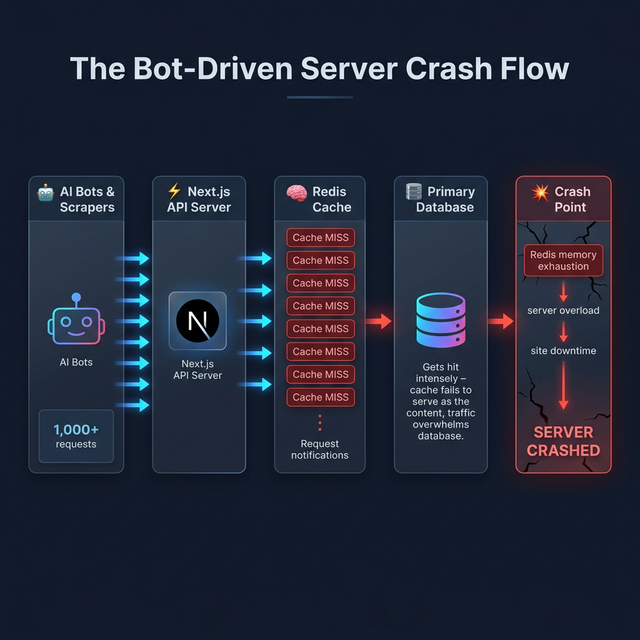 Figure 1: The Bot-Driven Server Crash Flow — how massive bot requests cascade into complete system failure.
When AI bots hit your site:
- Thousands of requests hit your APIs (bypassing normal user behavior).
- Bots frequently hit uncached or unique URLs, causing constant cache misses and forcing Redis to write new entries rapidly, exhausting memory.
- Redis memory fills up quickly due to caching unoptimized endpoints.
- Server starts throttling or crashing.
And boom 💥 — your entire site goes down.
The Hidden Danger Most Developers Ignore
The biggest mistake?
“Traffic is good for SEO, right?”
Not always. AI bot traffic is often bad for performance and SEO.
AI bot traffic:
- Does NOT convert
- Does NOT bring real users
- ONLY consumes server resources
- Can negatively impact Core Web Vitals if normal users experience slow load times — because bots and real users share the same server resources, these traffic spikes directly slow down page speeds for your human visitors.
So you're paying for infrastructure… just to serve bots.
How to Protect Your Website from AI Bot Attacks
Here are practical, real-world solutions and technical configurations you can implement today to stop web scrapers and malicious crawlers:
1. Control Bots Using robots.txt
Your first line of defense is your robots.txt file. You can block or control unwanted crawlers:
User-agent: *
Disallow: /api/
Disallow: /admin/

# Optional: slow down crawlers
Crawl-delay: 10

# Block specific AI bots
User-agent: GPTBot
Disallow: /

User-agent: Bytespider
Disallow: /

User-agent: CCBot
Disallow: /
📝 Never use
Disallow: /for Googlebot or Bingbot. Doing so will completely deindex your website from search results. Only block AI-specific crawlers like GPTBot, CCBot, or Bytespider that do not contribute to your search rankings.
This prevents unnecessary crawling of sensitive or heavy endpoints by "good actor" bots that respect the rules.
2. Implement Rate Limiting via Nginx (Very Important)
Even if bots ignore robots.txt, rate limiting will stop them. If you use Nginx as a reverse proxy, you can set up rate limiting by IP.
📝 Hosting Requirement: This configuration requires access to your server files (VPS or Dedicated server). If you are using standard Shared Hosting, you likely won't have access to Nginx settings and should focus on the Cloudflare method in the next section.
Nginx Configuration Snippet:
# Define the rate limit zone (10 requests per second per IP)
limit_req_zone $binary_remote_addr zone=mylimit:10m rate=10r/s;

server {
    listen 80;
    server_name yourwebsite.com;

    location /api/ {
        # Apply the rate limit
        limit_req zone=mylimit burst=20 nodelay;

        # Return 429 Too Many Requests when limit is exceeded
        error_page 429 = /rate_limit_error.html;

        proxy_pass http://localhost:3000;
    }
}
What does burst=20 nodelay mean?
Think of the "burst" like a small waiting room for your server. It allows a few extra requests (up to 20) to queue up safely during a sudden spike. The "nodelay" setting ensures that as long as there is room in that waiting room, legitimate users don't feel any artificial slowness.
This ensures your server stays stable even during spikes by effectively limiting requests per IP and blocking repeated hits.
3. Block Bots at CDN / Firewall Level (Cloudflare)
Use tools like Cloudflare or AWS WAF. They can detect bot traffic, challenge suspicious requests, and block bad actors before they hit your server.
Cloudflare WAF Rules Example:
- Navigate to Security -> WAF -> Custom Rules
- Create a rule to challenge or block known AI crawlers:
- Field:
User Agent - Operator:
contains - Value:
BytespiderORTurnitinBotORGPTBotORCCBotORClaudeBot
- Field:
- Action:
BlockorManaged Challenge
This reduces load before it even reaches your backend.
4. Protect Redis from Overload
Redis crashes are one of the biggest issues in AI bot attacks. Fix it by:
- Setting max memory limits
- Using the
allkeys-lruconfiguration policy - Avoiding unnecessary cache writes
- Adding request-level caching
Redis Config Example (redis.conf):
# Adjust this based on your server's available RAM
# (typically 50-75% of total memory)
maxmemory 2gb
maxmemory-policy allkeys-lru
⚠️ Monitoring Redis: Use the command
redis-cli INFO memoryto check your current usage. Ifused_memoryis consistently hitting yourmaxmemorylimit, it's time to upgrade your RAM or further optimize your caching logic.
This ensures Redis evicts old keys when full instead of crashing your application.
5. Cache Smartly (Not Blindly)
Instead of caching everything:
- Cache only essential responses
- Avoid caching bot-triggered requests: Skip caching for requests that look like scrapers (e.g., thousands of variations of search parameters)
- Use stale-while-revalidate strategy
Example: Next.js Middleware to Skip Bot Caching
// middleware.js
export function middleware(request) {
  const url = new URL(request.url);

  // Identify suspicious params used by scrapers
  const botParams = ['page', 'sort', 'filter'];
  const hasTooManyParams = url.searchParams.size > 5;

  if (hasTooManyParams) {
    // Set a header to tell your cache layer to bypass
    const response = NextResponse.next();
    response.headers.set('Cache-Control', 'no-store');
    return response;
  }
}
If you're using Next.js, optimize data fetching carefully. Be wary of dynamic routes /[slug] that heavily depend on APIs which bots can enumerate systematically.
6. Monitor Traffic in Real-Time
You can’t fix what you don’t see. To catch an attack early, look for these Bot Traffic Signals:
- Sudden Spikes in 'Unique' User Agents: High volume from agents like
BytespiderorGPTBot. - High API Hit Rates: Requests hitting your JSON/API endpoints at a rate impossible for a human (e.g., 50 requests/second from one IP).
- Non-Human Browsing Patterns: Rapidly clicking through every single paginated category (
/blog?page=1to/blog?page=5000) in seconds.
What a Bot Attack Looks Like in Your Logs:
If you tail your server logs (tail -f access.log), a bot-driven scraper attack often looks like this:
# Sample Nginx Access Log
192.168.1.1 - - [11/Mar/2026:14:00:01] "GET /api/v1/products?id=1023 HTTP/1.1" 200 ... "Bytespider"
192.168.1.1 - - [11/Mar/2026:14:00:02] "GET /api/v1/products?id=1024 HTTP/1.1" 200 ... "Bytespider"
192.168.1.1 - - [11/Mar/2026:14:00:03] "GET /api/v1/products?id=1025 HTTP/1.1" 200 ... "Bytespider"
Tools to use:
- Server logs (Loggly, Papertrail, or simple
grep) - Analytics dashboards (Google Analytics 4 can filter bot traffic, but real-time server logs are faster)
- APM tools like Datadog or New Relic
⚡ Pro Tip for SEO + Performance: Combining these security fixes with a strong Search Engine Optimization strategy ensures you attract real users rather than wasting server capacity on automated scrapers. High bot traffic can also indirectly damage your Core Web Vitals scores — if Googlebot is competing with scrapers for server resources, your real-user performance metrics will suffer.
Conclusion: Adapting to the AI-Driven Web
AI and automated scrapers are a permanent part of the web landscape in 2026. While they offer immense power for data collection and analysis, they also bring unique challenges for server stability and performance.
The websites that thrive are not necessarily the ones with the most total traffic — they are the ones that handle that traffic intelligently. By implementing a combination of robots.txt rules, Nginx rate limiting, Redis optimizations, and CDN-level protection, you can ensure your server remains stable, your human users stay happy, and your infrastructure costs stay under control.
Start with the basics, monitor your logs closely, and scale your protection as your site grows. In the modern web, not all traffic is good traffic.
After locking down your bot traffic, it is also worth auditing your site for broken links — aggressive scraper activity can sometimes expose dead endpoints that have gone unnoticed and are silently draining your crawl budget.
FAQs
How do I know if my site is being hit by AI bots?
Look for sudden spikes in your server logs (e.g., thousands of requests per minute from a single IP), high API hit rates on non-human patterns (like perfect sequential ID scraping), or unusual User Agent strings like Bytespider or GPTBot.
Will blocking AI bots hurt my SEO?
No, as long as you only block AI-specific crawlers like GPTBot or CCBot. These bots crawl for LLM training and data scraping, not for traditional search indexing. Never block Googlebot or Bingbot, as they are essential for your search rankings.
Does this apply to WordPress sites too?
Yes. While the specific configurations (like Nginx snippets) may differ depending on your hosting provider, the core principles of rate limiting, caching optimization, and bot protection are universal across all web platforms.
Why are AI bots hitting my website?
AI bots and web scrapers crawl websites to collect data for training LLM models, indexing, or scraping content for AI applications.
Can robots.txt completely stop AI bots?
No. It works for compliant bots (like GPTBot), but malicious or hidden scrapers may ignore it. Use Nginx rate limiting and Cloudflare WAF for full protection.
Why does Redis crash during bot traffic?
Because of excessive read/write operations and memory overflow caused by repeated requests hitting unique URLs and bypassing cache layers. A good LRU eviction policy prevents this.
What is the best way to prevent server crashes?
Combine robots.txt rules, rate limiting, CDN protection (Cloudflare), and proper caching strategies to block malicious bots before they hit your database.
Is AI bot traffic good for SEO?
No. It does not bring real users or conversions, inflates your analytics artificially, and can harm your server performance leading to negative SEO penalties via slow site speed.
Related Articles
Ready to Scale?
Our high-performance web solutions and SEO strategies are designed to deliver results.
Check out our services